Timesheet rounding
Timesheet rounding is applied to individual dock in and dock out time entries, not total hours. Rounding each time entry first keeps totals consistent across payroll, weekly, job, project, and other grouped reports.
Last updated - Jun 02, 2020 at 2:55PM
Types of rounding methods
Timesheet rounding can be performed using two types of methods:
Rounding timesheets to the nearest time interval
Timesheets can be rounded to the nearest 5 minute or 15 minute time segment. This rounds each dock in and dock out time entry to the nearest time segment, e.g. 7:00, 7:05, 7:10 for 5 minute rounding, and 7:00, 7:15, 7:30 for 15 minute rounding.
This rounds dock in and dock out times either up or down depending on what's nearest to the actual time entry.
Why TimeDock rounds each time entry
TimeDock rounds each individual dock in and dock out time entry before totals are calculated. This means the same rounded time entries are used consistently across timesheets, payroll exports, project reports, job reports, and other grouped views.
If rounding was applied only to the final total at the end, separate reports could disagree. For example, total hours for a specific job could be rounded differently from total hours for the same employee's week, so the job totals may not add back to the weekly total.
Rounding to a time segment avoids this discrepancy. Each time entry has one rounded start and finish time, and every report that uses that entry is built from the same rounded values.
Nearest-interval rounding is intended to be neutral over time because entries can round up or down depending on the nearest time segment. Always apply rounding settings consistently and check that they suit your payroll rules.
Rounding timesheets to [n] decimal places
Timesheets can be rounded to either 1 decimal place or 2 decimal places. To achieve this, each individual dock in and dock out time entry must be rounded to a fraction of an hour.
When rounding timesheets to 1 decimal place, each individual dock in and dock out time entry will be rounded to 1/10th of an hour (the nearest 6 minute segment). This rounds dock in and dock out times either up or down depending on what's nearest to the actual time entry.
When rounding timesheets to 2 decimal places, each individual dock in and dock out time entry will be rounded to 1/100th of an hour (the nearest 36 second segment). This rounds dock in and dock out times either up or down depending on what's nearest to the actual time entry.
Applying rounding options
Timesheet rounding can be applied when viewing timesheets by clicking on the preferred rounding option button in the toolbar above the timesheet table.

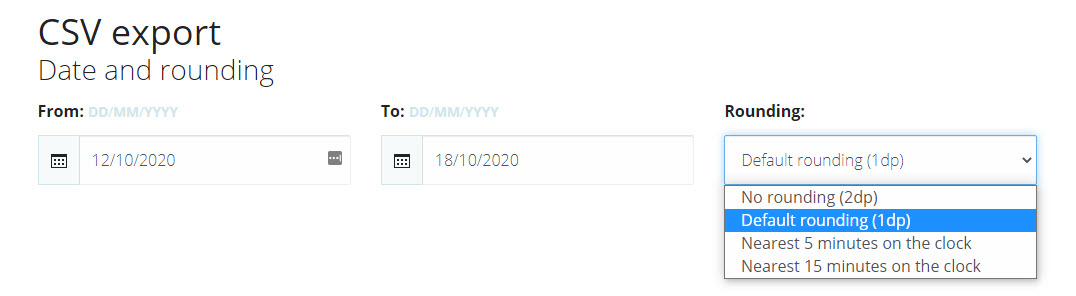
Timesheet rounding can also be applied when exporting/downloading timesheet data for payroll, Custom CSV, or when generating reports. Choose an option from the Rounding dropdown list when exporting timesheets or generating a report.
Timesheet rounding calculator
The table below shows how each method rounds dock in and dock out times, and how this can affect the total hours of a shift.
| Dock in | Dock out | Total hours | |
| No rounding (2dp) | 8.87 | ||
| Default rounding (1dp) | 07:06 AM | 03:54 PM | 8.8 |
| 5 minute rounding | 07:05 AM | 03:55 PM | 8.83 |
| 15 minute rounding | 07:00 AM | 04:00 PM | 9.00 |
Frequently asked questions about rounding
Can we round timesheets to 30 minutes or a whole hour?
The maximum interval you can round to is the nearest 15 minute time segment (e.g. 7am, 7:15am).
Can we round start times up, and finish times down?
You can only round times to the nearest interval. This is the most commonly accepted practice, to ensure that averaged over time the employee is not disadvantaged (leaving employers potentially liable).
Can we set an automatic start time?
No you can't. We've designed TimeDock to be an accurate and real-time solution for docking into work. If employees aren't docking in when they actually started work, they should be encouraged to do so.